Privileged access for every system you run, from the browser.
Any system. One browser tab. Every session accounted for.
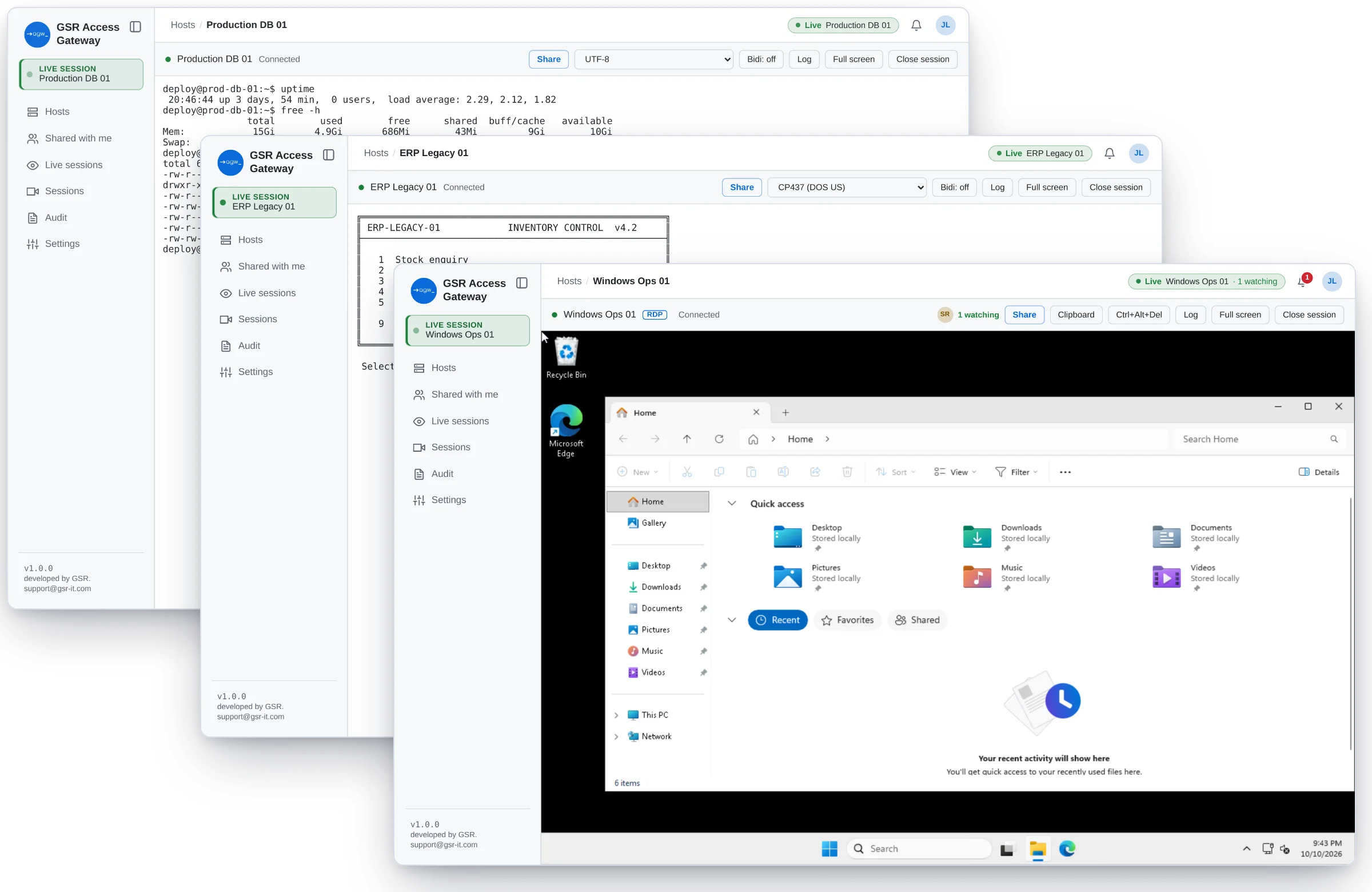
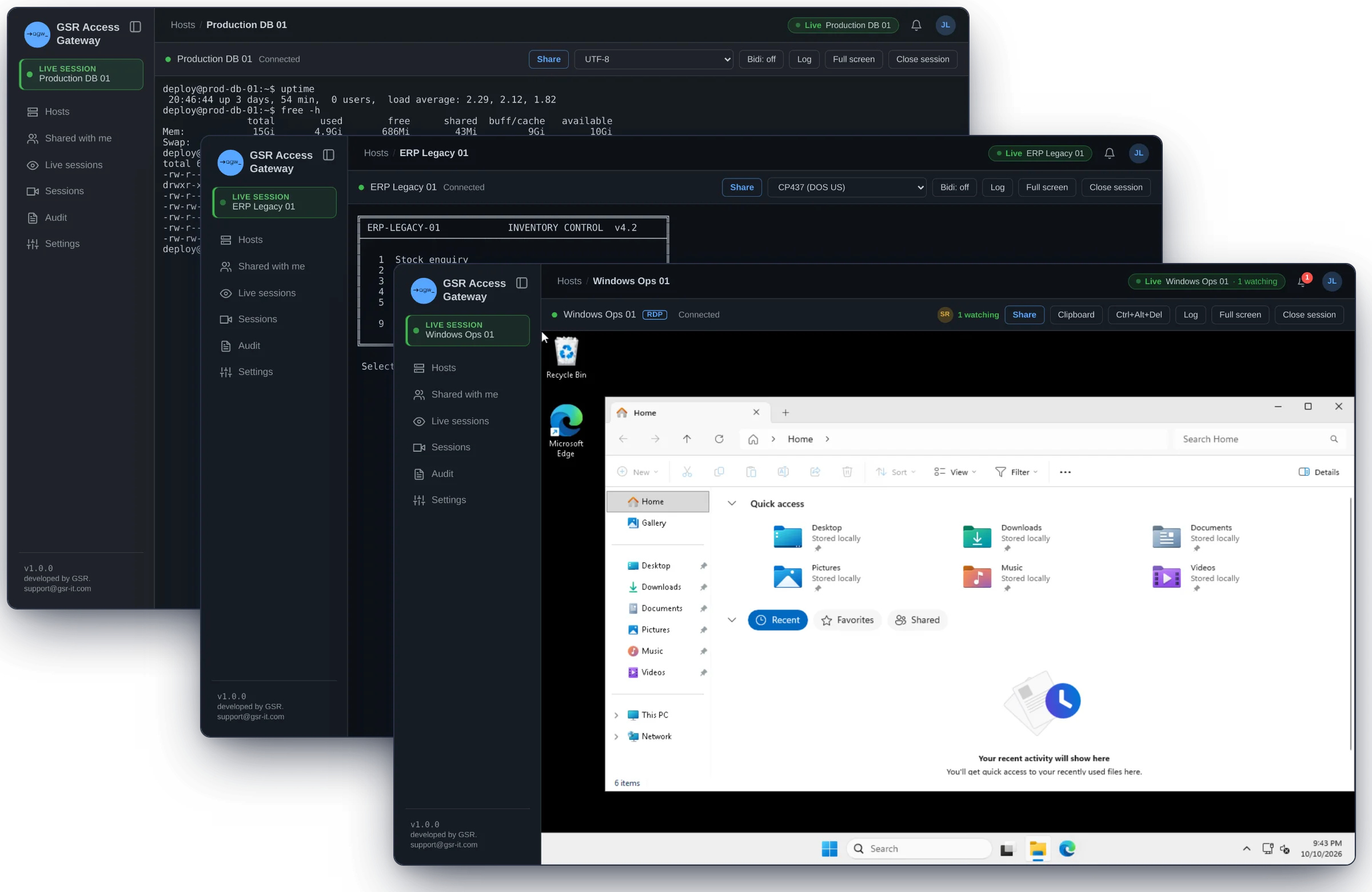
Linux and Windows servers, desktops, Telnet-era applications, network gear, databases and Kubernetes, all opened in the browser through one self-hosted gateway. Credentials never reach a laptop. Every session is recorded, searchable and attributed to a person.
No client to install
No passwords on laptops
No VPN for users
No agents on your systems
No unrecorded sessions
One front door for everything you run.
New or decades old, on-premises or in the cloud: if your people need to reach it, they reach it here, under the same access rules and the same audit trail.
Linux & Unix servers
A full terminal in the browser, with file transfer and verified host keys. Modern and legacy SSH alike.
Windows servers & desktops
Full remote desktops in the browser, from Windows Server 2016 to Windows 11, with file and clipboard policy.
Linux, Unix & macOS desktops
Graphical desktops next to everything else.
Legacy systems
Telnet-era applications and old Unix hosts, displayed correctly in 50 character encodings.
Network devices
Cisco, Juniper, Arista, Fortinet, MikroTik and HPE Aruba command lines, with every change recorded.
Databases
PostgreSQL, MySQL and SQL Server in a browser SQL console, with every query recorded.
Kubernetes
Shells into pods and a kubectl console, per cluster and namespace.
Web apps & isolated browser
Internal web apps through a disposable, isolated Chrome, with nothing left behind.
Ephemeral environments
ModuleA fresh machine, container or service for one session, destroyed when it ends.
Open any system in a browser tab.
- Users see only what they're allowed to reach, with live status, and open it with one click. No client, no VPN, no agent on the system.
- Move files where policy allows: SFTP next to the terminal, and upload/download on desktops, every file audited with its checksum.
- Your systems stay closed to user networks. Only the gateway reaches them.
One list for servers, desktops and legacy systems, with live status.
The right access, at the right time.
- Sign in with Entra ID, Okta, Google Workspace, any OIDC or SAML provider, or Active Directory, with multi-factor sign-in for local accounts. Everything is denied until you allow it.
- Standing access or just-in-time: users request a system for a reason and a time window, an approver says yes, and access expires on its own.
- Credentials are vaulted, rotated, and used on the user's behalf, never shown. Command, query, file and clipboard policies apply as people work.
Grant access per user or group, and check the effective result before saving.
Bring a colleague into a live session.
- Share a running terminal or desktop read-only or with full control, or share the recording afterwards.
- Every guest is signed in, and full control requires their own access to that system, so sharing never widens access.
- Everything a guest types or pastes is recorded under their own name.
Share live, read-only or with full control, or share the recording.
Every session on the record, and searchable.
- Every session is recorded, with no setup, and sealed when it ends. Keep recordings on write-once storage if your auditors require it.
- Search every command, query and keystroke across all sessions, and jump straight to that moment in the replay. AI review summarizes each session and flags what deserves a second look.
- Watch live sessions, end one with a recorded reason, and stream every event to your SIEM, Slack or Teams.
Replay any session, with its integrity verified.
From request to evidence, in one place.
- 01
Request
ask for access, or use a standing grant
- 02
Connect
open the system in a browser tab
- 03
Collaborate
share live when you need a second pair of eyes
- 04
Oversee
reviewers watch live and can end a session
- 05
Prove
search, replay and audit, any time
A fresh system for every session.
Define templates (a container, a Kubernetes pod, a cloud VM on AWS or Azure, or a VMware vSphere template) and let users launch exactly what they need, just in time. The gateway creates it, signs in with one-time credentials, records the session, and destroys the environment when the session ends or its time runs out. Nothing lingers, and nothing goes unrecorded.
- Templates you control
- Destroyed on exit or on timeout
- Every lifecycle step in the audit log
Built for the access you're asked to justify.
Third-party & vendor access
Give vendors a browser tab for a set time window, approved by you, instead of a VPN account and a shared password.
Audit & compliance evidence
Hand auditors searchable, sealed recordings and a complete audit trail, without giving them server access.
Legacy & OT systems
Put modern sign-in, recording and access control in front of systems you can't change.
Live support & collaboration
Pull a senior engineer into a live session instead of sharing screens over a call.
Replace VPNs & jump hosts
One audited front door instead of VPN profiles, jump boxes and copied keys.
Designed to fail closed.
Deny by default: every permission is granted explicitly. Even administrators need a grant to connect to a system or view its recordings.
Verified systems: a changed host key or certificate is refused and logged.
Credentials in a vault: AES-256-GCM, key kept outside the database, automatic rotation, or your existing vault.
Hardened sign-in: MFA, rate limiting and lockout. Disabling an account ends its sessions everywhere within seconds.
Your data stays yours: recordings, logs and credentials never leave your infrastructure.
Inside your network. Under your control.
Run the gateway on a single VM with Docker, or highly available on Kubernetes. Air-gapped sites get a complete offline package for x86-64 or ARM64. Users reach one HTTPS address, and your systems need only their usual protocols, with no agent on any of them.
Works with
A product, from a team that runs infrastructure.
GSR Access Gateway is built and supported by GSR, the team behind the LEA configuration-compliance platform and an IT services practice for enterprise infrastructure. You work directly with the engineers who build it.
Self-hosted, no SaaS dependency
Open recording formats (asciicast v2, Guacamole)
Direct engineering support with defined response times
Prove it on your own systems.
A proof of concept runs inside your environment, on the systems you choose, with success criteria agreed up front.
- 01Scope call
- 02Deploy & connect your systems
- 03Review the evidence together